# Turn Claude/Cursor into a
data science workbench.

dante-ds is a Python library and MCP server for Agentic Data Science.
Agents write SQL, integrate your company's style, and have tailored behavior.

~
$ pip install dante-ds[postgres]
Successfully installed dante-ds-0.1.0
$ claude "what were our top customers last quarter?"
dante Querying analytics.customers... found 2,847 rows
dante Building visualization...
dante Top 10 customers by revenue (Q4 2025):
  1. Acme Corp โ”€โ”€ $2.4M
  2. Globex โ”€โ”€ $1.8M
  3. Initech โ”€โ”€ $1.2M
  ... rendered chart to output.html

// what_dante_is

dante-ds is a free, open-source Python library. You pip install it, point it at your data sources, and it learns the validated SQL behind your existing dashboards. Each query gets paired with a plain-language description of what it answers. These pairs become embeddings: a searchable knowledge base of your team's actual work.

It also generates a rules library that encodes your conventions: which tables to use, which filters to apply, which definitions changed and when. Presentation standards so your charts and decks look amazing everytime.

dante-ds registers as an MCP server for Claude Code, so when you ask a question, Claude searches your embeddings and reads your rules before writing a single line of SQL


// what_dante_solves

Inaccurate SQL and inconsistent agents.

Documentation goes stale. Semantic layers need governance committees. Dante works the other way: semantics are discovered agentically and every query you write teaches the system something. Every correction becomes a data point. The AI's understanding of your data compounds, because the work itself is the input.

// dante_features

Everything Claude/Cursor needs to be your data science co-pilot.

Automated Context Curation

Leverage your company's existing charts and dashboards to create a semantic library of SQL Queries your tool can leverage to write perfect SQL, the first time.

Python stdio transport

Consistent Agentic Behavior

Perfect presentations using your brand's colors and fonts, distinct personalities tailored to data science, and custom agentic tool use for every project.

SQL 8 adapters

Beautiful UI

Dante-DS comes equipped with a beautiful UI to manage your knowledge library through easy visual interaction.

Python plotly.js

MCP Server

Runs as a Model Context Protocol server. Claude Code discovers database tools automatically, with no prompt engineering required.
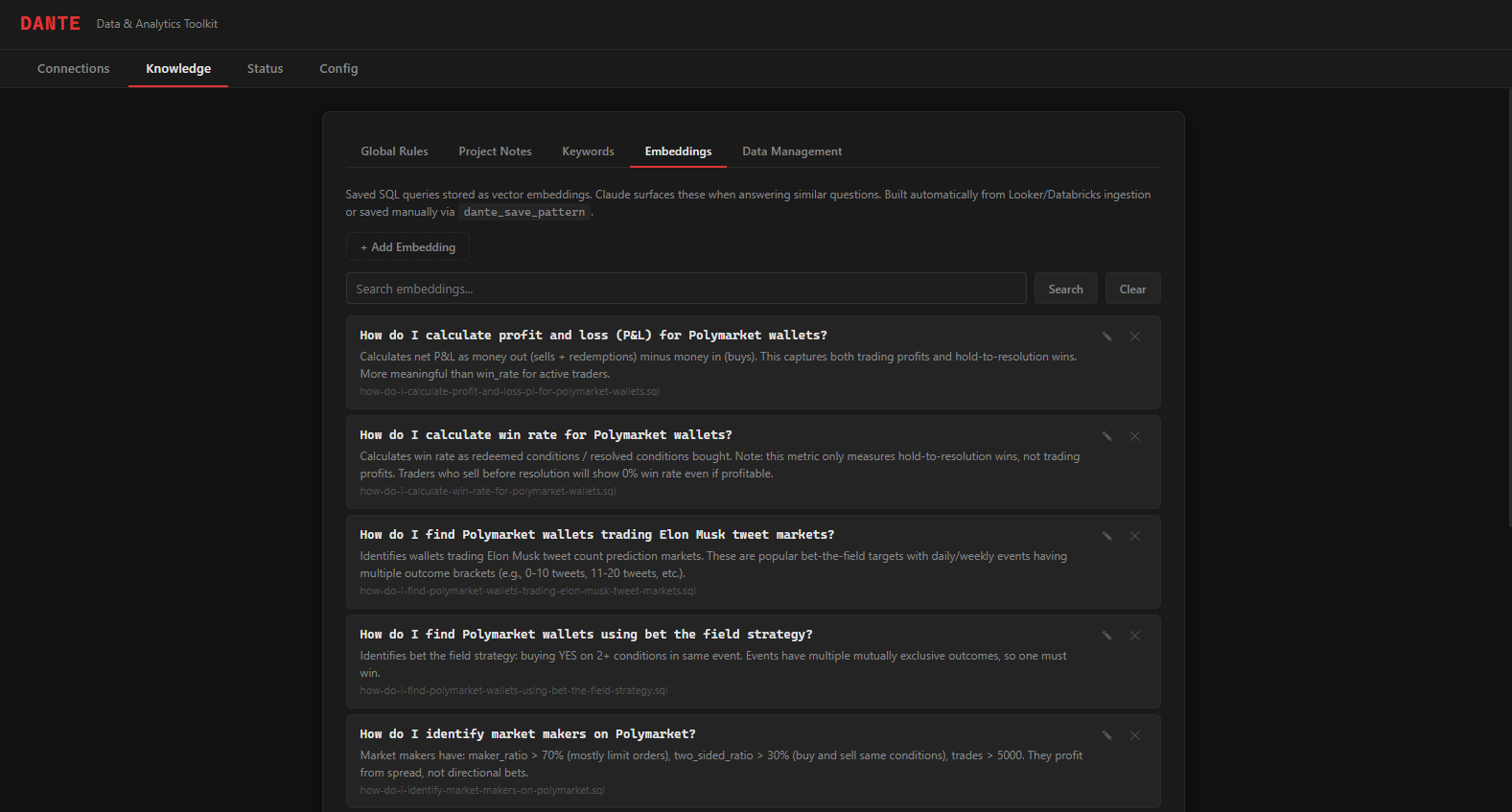
SQL introspection
Dante embeddings knowledge base

// how_it_works

Three steps from zero to querying your production database inside Claude Code with your data science team's knowledge powering it.

1

Install the package

Pick your database extras: pip install dante-ds[postgres,snowflake]

2

Create your context

Fill in your connection settings and tell dante-ds to create your first embeddings library

3

Start asking questions

"What were our top 10 customers by revenue last quarter?" Claude writes the SQL, runs it, and returns the results.

// quick_start

Install, configure, and start querying.

terminal
    # core package
    $ pip install dante-ds

    # getting started
    $ dante launch # Opens UI, visual setup
    $ claude # Launch Claude
    claude How many MAU do we have? # Done.

// supported_databases

Install only the drivers you need. Each database is an optional extra.

PostgreSQL Snowflake BigQuery Databricks MySQL Looker DuckDB Parquet

Data science at the speed of thought.

Stop context-switching between your editor and a SQL client. Let Claude handle the queries.

# The brain behind
your data team.

dante-ds gives each analyst a local nervous system. Dante Studio is the central brain that consolidates everything: embeddings, rules, and validated SQL patterns from across your team.

When one analyst discovers a better way to calculate churn, the whole team gets it. Every correction propagates. Every query makes the system smarter. Studio turns individual knowledge into shared intelligence.

And more: Accurate text-to-SQL analytics and gorgeous, shareable reports. Built on your context, not generic prompts.

// how_it_works

Individual analysts build local context. Studio consolidates it into shared intelligence.

1

Ingest existing knowledge

Studio connects to your BI tools and warehouse, extracting validated SQL from every chart your team has already built.

2

Build the embedding database

Every extracted query becomes a question-SQL pair stored as a vector embedding. Thousands of real patterns, searchable by meaning.

3

Compound over time

Every query your team writes teaches the system something. Corrections propagate. The AI goes from approximate to deeply expert.

4

Chat, build, publish

Ask questions in plain English, build interactive data apps, and publish shareable reports with clean URLs.

// features

A central nervous system for your data team, with the tools to act on what it knows.

Conversational Analytics

Chat with an AI agent that writes SQL, runs Python, and builds visualizations. Powered by Claude with streaming responses.

TypeScript Claude Agent SDK

Interactive Data Apps

Build dashboards from templates: KPI cards, chart grids, and map explorers. AI generates the HTML, CSS, and JS.

React live preview

Notebooks

Jupyter-style computational notebooks with a multi-step analysis pipeline. Code cells execute in isolated kernels.

Python sandboxed

Shareable Reports

Publish data apps with clean vanity URLs. Set visibility to public or org-only. Lock reports to prevent edits.

vanity URLs access control

Shared Knowledge Base

Consolidate embeddings, rules, and validated SQL patterns from across your team. The system gets smarter as people work, not when someone remembers to update docs.

pgvector RAG

Enterprise Ready

Google OAuth, role-based access, encrypted credentials, per-user token budgets, and full usage tracking.

OAuth 2.0 RBAC

// integrations

Bring your own data. Studio reads from your warehouse and BI tools, with nothing to migrate.

PostgreSQL Databricks Looker DuckDB Parquet Snowflake BigQuery MCP Servers

Stop maintaining tribal knowledge. Let the work be the input.

Every query your team writes makes the system smarter. Start building your company's data nervous system.