// a_good_look
You can uplevel your AI output by using a simple style guide in your rules.mdc and CLAUDE.md files, maintaining a consistent visual theme in all your outputs, including reports, presentations, decks. This will make all your work look more professional, and since most data teams have no design system at all, creating one is a great opportunity for some branding.
Claude Code reads a CLAUDE.md file (or Cursor reads
a .cursorrules / rules.mdc file)
every time it starts a session. These are persistent instruction
files that shape how the AI writes code for you.
You'll see these most often used for coding conventions and agent behaviors. They're a great place to store a lightweight visual design system as well.
Every time you ask Claude to build a dashboard, chart, or report the AI already knows your colors, typography, and layout preferences. The rules are loaded before the conversation even starts. Your last mile work always looks good.
With dante-ds, you can automatically always use a style, and edit it easily from the UI. Here's how it works.
// the_rules_file
# Data Science Dashboard Design System

This document defines the visual system for HTML dashboards,
data apps, and visualizations.
Dark-mode-first. Consistent. Readable.

---

## 1. Core Principles

1. Dark mode is default
2. Low visual noise
3. Data clarity over decoration
4. Consistent spacing and alignment
5. Minimal color usage — reserve color for meaning

---

## 2. Design Tokens (CSS Variables)

```css
:root {
  --bg: #111111;
  --surface: #1A1A1A;
  --surface-2: #242424;
  --border: #2A2A2A;

  --text-primary: #E8E8E8;
  --text-secondary: #888888;

  --accent: #E03535;
  --accent-dark: #8F0B0B;

  --success: #4ADE80;
  --warning: #FBBF24;
}
```

## 3. Color Rules

- Background: always #111111
- Cards: always #1A1A1A
- Borders: always #2A2A2A
- Accent red: use sparingly
- Status colors only for semantic meaning

## 4. Typography

UI text: -apple-system, BlinkMacSystemFont, 'Segoe UI', sans-serif
Code/data: 'SF Mono', 'Fira Code', 'Consolas', monospace

| Element        | Size | Weight |
|----------------|------|--------|
| Page Title     | 28px | 600    |
| Section Title  | 20px | 600    |
| Card Title     | 16px | 600    |
| Body Text      | 14px | 400    |
| Small / Meta   | 12px | 400    |

Rules:
- Max two font sizes per card
- Data values may be slightly larger (16-18px)
- Prefer consistent weights over many sizes

## 5. Spacing (8px grid)

xs: 4px   sm: 8px   md: 16px
lg: 24px  xl: 32px  2xl: 48px

- Card padding: 16px
- Card gap: 16px
- Section spacing: 32px
- Chart title spacing: 8px
- Avoid arbitrary spacing values.

## 6. Layout

- Page padding: 32px
- Max content width: 1400px
- 12-column grid, default card width: 3-4 columns

Card styling:
  background: #1A1A1A
  border: 1px solid #2A2A2A
  border-radius: 10px
  padding: 16px

## 7. Charts

| Purpose          | Color   |
|------------------|---------|
| Primary series   | #E03535 |
| Secondary series | #888888 |
| Positive         | #4ADE80 |
| Warning          | #FBBF24 |

- Subtle gridlines
- Max 5 series per chart
- Labels use primary text color
- Chart background matches page background

## 8. Depth

Use layered surfaces, not shadows.
Page: #111111 → Card: #1A1A1A → Raised: #242424

- No drop shadows
- Borders for separation
- Darker layers = deeper hierarchy
// use_with_dante
With dante-ds you can simply update your global rules in the knowledge tab, and begin with your presentation standards, every time. This uniquely ensures consistency between Claude Code and Cursor both.
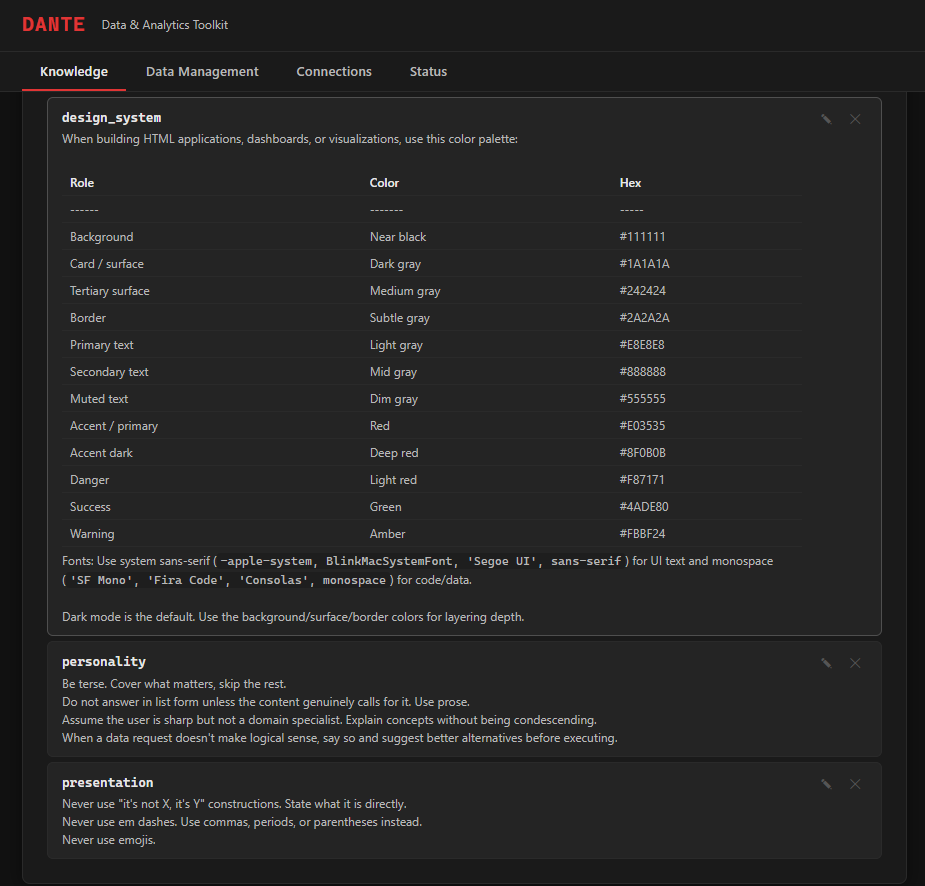
Dante Studio takes this further. Instead of individual data scientists having rules files, you can centralize control and keep everyone up-to-date from a visual UI.
// use_with_cursor
In Cursor you can use a global rule, accessible through File -> Preferences -> Cursor Settings -> Rules, Skills, Subagents.
// use_with_claude_code
You can copy your minimal design guide directly into ~/.claude/CLAUDE.md. This will ensure global context in all Claude Code sessions, but not in Cursor.